Blog Search Function: Why It Drives Customers Away
You spent real time writing those blog posts. Maybe not as many as you planned – life has a way of interrupting good intentions, as we talked about in Why Your Business Blog Died (And How to Revive It). But the posts are there. Useful stuff. Honest answers to real questions your customers ask. And yet, when someone lands on your site and types something into your blog search function, they get a page full of irrelevant results – or nothing at all. So they leave. Probably to a competitor who made it easier to find answers. That’s a painful thing to realize, but it’s fixable. Let’s walk through it together.
Why Your Blog Search Function Is Quietly Costing You Customers
Most small business websites use a default search tool that came baked into their theme or platform. It works, sort of. It finds pages. It returns results. But “finding pages” and “helping a real person find what they need” are two very different things.
Here’s what typically happens. A visitor – let’s say she’s a homeowner looking for a local plumber – lands on your plumbing blog. She’s read one post and wants more. She types “water heater problems” into your search bar. Your default search tool searches post titles and maybe some metadata. It returns three posts that technically mention water heaters, but two of them are about installation costs from four years ago, and one is a generic listicle that doesn’t answer her question at all.
She bounces. You never knew she was there.
This isn’t a rare edge case. It happens dozens or hundreds of times a month on small business blogs, silently draining the value of every post you’ve ever written.
What Makes a Blog Search Function Actually Work
Before we get into fixes, it helps to understand what a good search experience looks like from your visitor’s perspective. They’re not thinking about your site structure. They’re not thinking about categories or tags. They just have a question, and they want the answer fast.
A search tool that works does three things well.
First, it understands natural language. People don’t search the way they write formal queries. They type fragments, questions, misspellings, and conversational phrases. Your search function needs to handle all of that gracefully.
Second, it surfaces relevant content, not just matching content. There’s a big difference. Matching content contains the keyword. Relevant content actually answers the question. The best search tools use a combination of recency, engagement signals, and semantic understanding to rank results.
Third, it tells the visitor what to do next when it can’t find a perfect match. A blank “no results” page is a dead end. A good search result page suggests related posts, popular content, or a way to contact you directly.
The Real Problem: Your Content Isn’t Organized for Search
Here’s something a lot of folks don’t want to hear: sometimes the search function isn’t the problem. Sometimes the content itself is organized in a way that makes it nearly unsearchable – even by a great tool.
If your posts have vague titles, no clear categories, and tags applied randomly, even the best search plugin in the world can’t surface the right content. We covered the importance of smart organization in Blog Categories That Actually Help Customers Find You, and that foundation matters enormously here.
Think of your blog like a hardware store. If the inventory is organized well – bolts with bolts, paint with paint, clearly labeled aisles – any employee can help a customer find what they need fast. But if everything got tossed in randomly over the years, even the most helpful employee is going to struggle.
So before you touch your search settings, do a quick honest assessment of your content structure. Are your post titles specific and descriptive? Do your categories make sense to a customer, not just to you? If not, that’s worth addressing first. A content audit is a great place to start getting your house in order.
Practical Ways to Improve Your Blog Search Function
Alright, let’s get practical. Here are the real steps you can take, even if you’re not a tech person.
1. Replace Your Default Search With a Better Plugin
If you’re on WordPress – and most small business blogs are – your default search is notoriously weak. It does a basic keyword match against post titles and content, and that’s about it. It doesn’t understand synonyms, doesn’t rank by relevance intelligently, and doesn’t handle typos.
There are free and low-cost plugins specifically built to fix this. Look for options that offer full-text indexing, relevance scoring, and customizable result displays. Some popular choices have been around for years and are well-supported. The key features to look for are these: synonym support, fuzzy matching for typos, the ability to weight titles more heavily than body text, and a clean results page layout.
Installing a dedicated search plugin takes maybe thirty minutes, and it can meaningfully change what visitors experience when they go looking for something.
2. Add a “No Results” Page That Actually Helps
This is one of the easiest wins and one of the most overlooked. When someone searches and finds nothing, what does your site show them?
Most sites show a blank white page with the text “No results found.” That’s it. That’s the entire experience. The visitor stares at it for two seconds and clicks back.
Instead, your no-results page should do a few things. It should acknowledge that the search didn’t find what they needed. It should suggest your most popular posts or your best content categories. And it should offer a direct path to contact you – because if someone is searching your blog, they probably have a question you could answer personally.
This one change – a thoughtful no-results page – can recover a significant percentage of visitors who would otherwise disappear forever.
3. Make Sure Your Search Box Is Easy to Find
This sounds almost too basic to mention, but you’d be surprised. Many small business blogs have a search bar tucked in the footer, or buried in a sidebar widget that’s only visible on desktop. On mobile, it might not appear at all.
Your blog search function should be visible and accessible on every device, on every page. On mobile especially – where a large portion of your traffic is likely coming from – the search bar needs to be prominent. A magnifying glass icon in your main navigation that expands into a full search bar is a widely accepted pattern that works well.
Check your own site right now on your phone. Can you find the search function in under three seconds? If not, your visitors can’t either.
4. Connect Your Search to Your Best Content Intentionally
Here’s a slightly more advanced move that pays off. Most search plugins let you “boost” certain posts so they appear higher in results for specific queries. This is worth using strategically.
Think about the questions your customers ask most often. Then make sure that your single best, most complete post on each of those topics is boosted for the relevant search terms. If you’ve written a thorough guide on something – the kind of post that actually converts a reader into a customer – make sure your search tool knows it’s your most important piece of content on that subject.
This ties directly into having content worth finding in the first place. If you’re still figuring out what topics to write about, Blog Topics That Drive Business Results for Small Owners is a good read to get that thinking sorted out.
5. Use Internal Links to Support Search Discovery
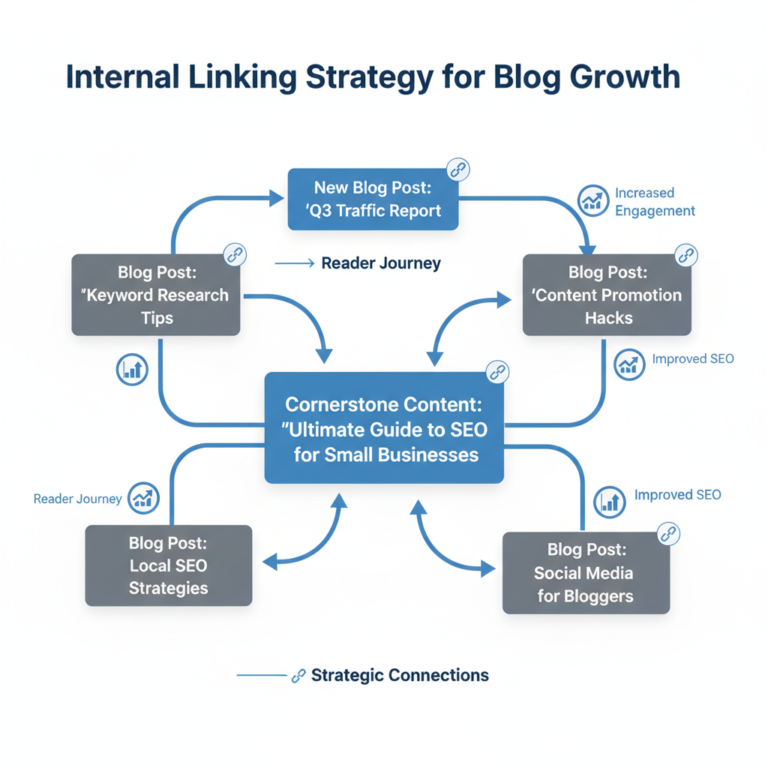
Internal links serve double duty. They help search engines understand your site, yes. But they also help human visitors navigate from one relevant piece of content to the next – which is especially valuable when your search function doesn’t quite surface the right post on the first try.
When a visitor lands on a post from search and it’s not quite what they needed, a well-placed internal link might save them. They can keep exploring rather than leaving. Think of internal links as a backup navigation system that catches people your search bar might miss.
Building those links consistently is part of good blog maintenance. And if you’re trying to do all of this without spending every spare hour on content work, Create More, Write Less has some ideas that might help you work smarter.
How to Know If Your Blog Search Is Actually Getting Better
You can’t improve what you don’t measure – and the good news is that search behavior is measurable. If you have Google Analytics or a similar tool installed on your site, you can enable site search tracking. This tells you exactly what people are typing into your search bar.
That data is gold. Seriously. It shows you what your visitors want but aren’t finding. It reveals gaps in your content. It tells you which topics you should be writing about next, because real people are already showing up and asking for them.
Check that data monthly. If you see the same search terms coming up repeatedly with no good results, that’s your content calendar right there. Write the post. Answer the question. Fix the gap. This connects nicely to the broader idea of tracking what actually matters on your blog, which we covered in Blog Metrics That Matter: Track Business Results, Not Vanity.
The Bigger Picture: Your Blog Should Be Working for You
Here’s the thing about all of this. Your blog represents real work. Real time you carved out of busy days. Real knowledge you put into words. Every post you’ve written has the potential to bring in a customer, answer a question, and build trust with someone who’s never met you.
But that potential only gets realized if people can actually find what you’ve written. A broken or mediocre blog search function is like having a brilliant salesperson who mumbles. The knowledge is there. The helpfulness is there. But the communication breaks down at the moment of connection.
Fixing your search experience isn’t glamorous work. It won’t feel as satisfying as writing a great post. But it’s the kind of quiet, foundational improvement that makes everything else you’ve done more valuable.
And if you’ve let your blog go quiet for a while – which, honestly, most small business owners have at some point – the good news is that improving your search function is one of the best ways to get more mileage out of the content you already have. You don’t need to write a hundred new posts to start sending better signals to visitors. You just need to make it easier for them to find the good stuff that’s already there.
Start small. Check your search bar on mobile today. Install a better search plugin this week. Set up site search tracking so you can see what people are looking for. Those three steps alone put you ahead of most small business blogs out there.
And when you’re ready to start adding fresh content to give your improved search function even more to work with, The 15-Minute Blog Post That Actually Works is a good reminder that you don’t need to carve out half a day to make it happen.
Your blog has more value sitting in it than you probably realize. A working blog search function is how you unlock it.