Blog Loading Speed: The Hidden Cost Killing Your Business
Your blog loading speed is costing you customers right now. While you’re focused on creating great content, that three-second delay is sending potential clients straight to your competitors. It’s not just about impatient visitors – blog loading speed directly impacts your search rankings, conversion rates, and bottom line.
Here’s the reality: Google considers page speed a ranking factor. Amazon found that every 100ms delay costs them 1% in sales. Your small business blog might not have Amazon’s traffic, but the principle remains. Slow content equals lost opportunity.
The good news? You don’t need technical expertise to fix most speed issues. Let’s walk through the real-world fixes that’ll get your blog performing like it should.
The Real Business Impact of Slow Blog Loading Speed
Before diving into solutions, let’s understand what you’re actually losing. A slow blog doesn’t just frustrate readers – it creates a cascade of business problems.
Search engines penalize slow sites. Google’s algorithm considers loading speed when ranking pages. If your blog takes four seconds to load while your competitor’s loads in two, guess who’s showing up first in search results?
Visitors bounce faster than you’d expect. Studies consistently show that 40% of visitors abandon a site that takes more than three seconds to load. Think about your own browsing habits – when was the last time you waited patiently for a slow page?
Mobile users are even less forgiving. With over half of web traffic coming from mobile devices, that sluggish loading time hits harder. Mobile users expect instant results, and they’ll find them elsewhere if your blog can’t deliver.
The conversion impact hurts most. Even visitors who stick around are less likely to engage with slow content. They’re less likely to read multiple posts, less likely to sign up for your newsletter, and definitely less likely to contact you for services.
Quick Wins: Image Optimization Without the Headache
Images cause most blog speed problems. They’re also the easiest to fix. You don’t need Photoshop skills or technical wizardry – just some common sense and basic tools.
Start with image sizes. That 3MB photo from your phone doesn’t need to be 3MB on your blog. Most blog images look great at under 200KB. Many free online tools compress images without visible quality loss.
Choose the right format. JPEG works best for photos with lots of colors. PNG handles graphics and images with transparency. The newer WebP format offers excellent compression but isn’t supported everywhere yet.
Resize before uploading. Don’t upload a 4000-pixel-wide image and let your blog software shrink it to 800 pixels. Do the resizing beforehand. Your blog will thank you, and so will your visitors.
Consider lazy loading. This technique loads images only when visitors scroll to them. It’s like having a conversation where you only bring up topics as they become relevant – much more efficient.
Tools That Actually Help
TinyPNG compresses images effectively and it’s free. Canva resizes images and offers basic optimization. Even your phone’s built-in editing tools can reduce file sizes significantly.
Most WordPress plugins handle image optimization automatically. They compress new uploads and can optimize existing images in bulk. Set it once, forget about it.
Platform-Specific Speed Improvements
Your blogging platform matters more than you might think. Each has different strengths and weaknesses when it comes to blog loading speed.
WordPress users have the most options and the most problems. The flexibility that makes WordPress powerful also makes it bloated. Too many plugins, heavy themes, and poor hosting choices create speed nightmares.
Start with your theme. Those beautiful, feature-rich themes often load slowly. Sometimes a simpler theme that loads fast serves your business better than a stunning one that drives visitors away.
Plugin cleanup makes a huge difference. Every plugin adds code to your site. That contact form plugin you installed two years ago but never use? It’s still slowing down every page load. Deactivate and delete unused plugins regularly.
Caching plugins work like magic for WordPress. They create static versions of your pages, so your server doesn’t have to build each page from scratch every time someone visits. It’s like meal prepping for your website.
Other Platform Considerations
Squarespace and Wix handle many speed optimizations automatically, but you sacrifice some control. They’re generally faster out of the box but offer fewer customization options for advanced optimization.
Ghost and other modern platforms prioritize speed by design. They might require more technical knowledge to set up, but they often deliver better performance with less effort.
Hosting: The Foundation You Can’t Ignore
Cheap hosting costs more than expensive hosting when you factor in lost business. That $3/month shared hosting plan might seem budget-friendly, but it’s probably costing you customers.
Shared hosting puts your blog on a server with hundreds of other sites. When they get busy, your site slows down. It’s like trying to have a conversation in a crowded restaurant – possible, but not ideal.
Managed hosting providers optimize specifically for your platform. They handle updates, security, and performance optimization. Yes, it costs more, but it often pays for itself through improved performance and reduced maintenance headaches.
Content Delivery Networks (CDNs) serve your content from servers closer to your visitors. If your hosting is in Texas but your visitor is in New York, the CDN serves your images from a New York server instead. Geography matters on the internet.
Red Flags to Avoid
Unlimited everything usually means limited performance. Providers offering unlimited bandwidth and storage often oversell their servers. You get what you pay for, and unlimited rarely means what it sounds like.
Uptime guarantees matter. 99% uptime sounds good until you realize that means 7 hours of downtime per month. Look for 99.9% or better, and check if they actually honor their guarantees.
Content Strategy That Supports Speed
Sometimes the problem isn’t technical – it’s strategic. How you create and organize content affects loading speed more than you’d expect.
Long-form content loads slower than shorter posts. That doesn’t mean you should avoid depth, but consider breaking monster posts into series. Your readers get digestible chunks, and your pages load faster.
Embedded content adds weight. Every YouTube video, social media embed, and third-party widget slows down your page. Use them strategically, not automatically.
Related posts and recommendations increase engagement but also increase load times. Find the balance between helpful suggestions and page bloat.
As I discussed in The 15-Minute Blog Post That Actually Works, simpler often works better. This applies to loading speed too – simpler posts generally load faster and perform better.
Content Planning for Speed
When you’re doing content planning for real people with real lives, factor in loading speed from the start. Plan posts that serve your readers without overwhelming your servers.
Consider your blog topics that drive business results – are they image-heavy? Video-heavy? Plan your resources accordingly.
Measuring What Matters: Speed Testing Tools
You can’t improve what you don’t measure. Several free tools tell you exactly how your blog loading speed performs and what needs fixing.
Google PageSpeed Insights provides scores and specific recommendations. It tests both mobile and desktop performance, showing you exactly what’s slowing things down.
GTmetrix offers detailed reports with waterfall charts showing exactly when each element loads. It’s like getting an X-ray of your page loading process.
Your browser’s developer tools show loading times in real-time. Press F12 in most browsers and reload your page to see what’s happening behind the scenes.
Test regularly, not just once. Page speed can change as you add content, install plugins, or make design changes. Monthly speed checks prevent small problems from becoming big ones.
Understanding the Numbers
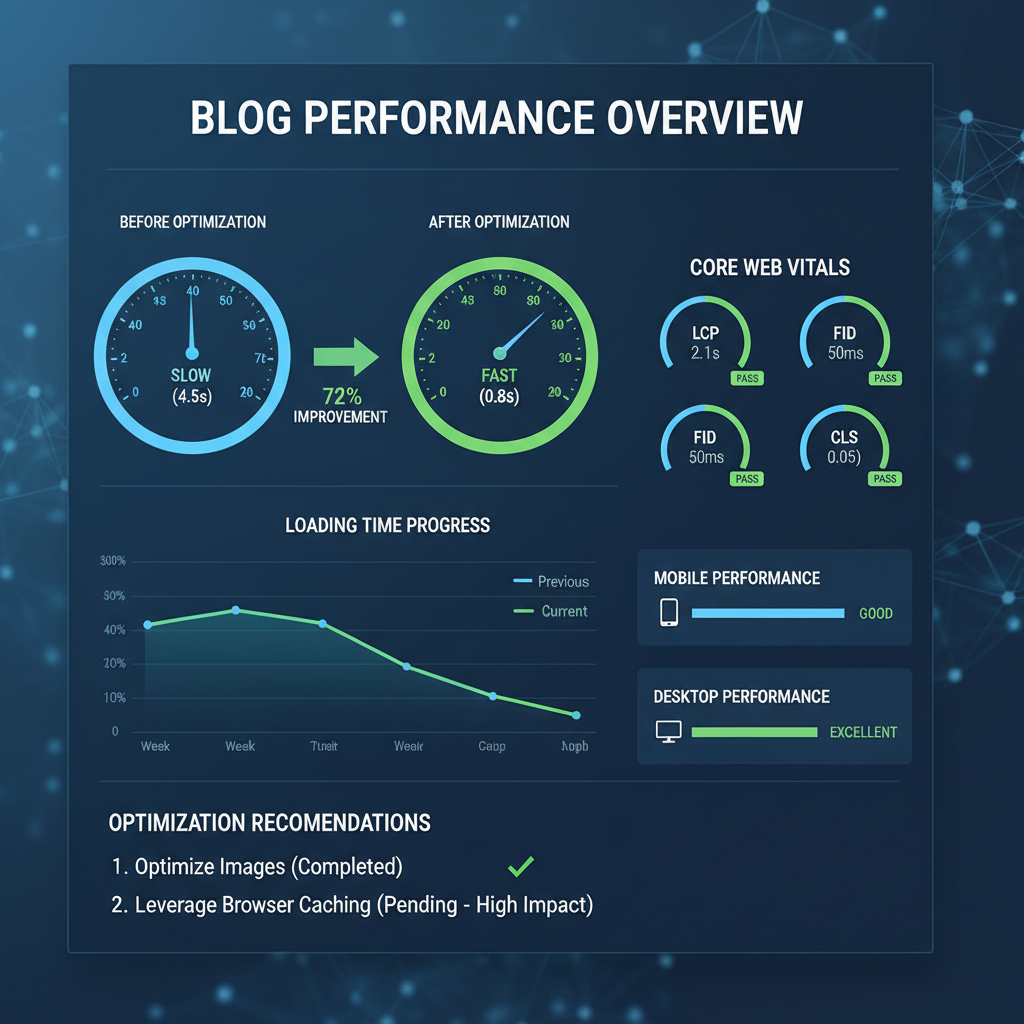
Aim for load times under three seconds on desktop, under five seconds on mobile. These aren’t arbitrary numbers – they’re based on user behavior research.
Core Web Vitals matter for Google rankings. Largest Contentful Paint (LCP), First Input Delay (FID), and Cumulative Layout Shift (CLS) sound technical, but they measure real user experience.
The Mobile Speed Reality
Mobile performance often differs dramatically from desktop. A blog that loads quickly on your office computer might crawl on mobile devices.
Mobile processors are less powerful. They handle complex layouts and heavy images differently than desktop computers. What works on desktop doesn’t automatically work on mobile.
Network connections vary wildly on mobile. Your blog needs to perform on both fast WiFi and slower cellular connections. Design for the lowest common denominator, not the ideal scenario.
Touch interfaces require different considerations. Buttons need to be appropriately sized, and loading states need to be clear. A confused mobile user leaves faster than a confused desktop user.
Advanced Fixes That Don’t Require Programming
Some speed improvements require technical knowledge, but many powerful optimizations are accessible to non-technical business owners.
Database cleanup removes unnecessary data that accumulates over time. WordPress stores post revisions, spam comments, and plugin data that you’ll never need. Clean it out regularly.
File compression reduces the size of your code files. GZIP compression can reduce file sizes by 70% or more. Most hosting providers enable this automatically, but it’s worth checking.
Font optimization matters more than most people realize. Custom fonts need to download before text displays properly. Limit custom fonts to one or two, and choose fonts that load quickly.
Code Cleanup Without Coding
Minification removes unnecessary spaces and characters from code files. It’s like removing all the spaces from a sentence – still readable by computers, but much smaller.
Many plugins handle minification automatically. They combine multiple CSS files into one, compress JavaScript, and optimize how code loads.
When to Get Help vs. DIY
Most small business owners can handle basic speed optimizations. Image compression, plugin cleanup, and hosting upgrades don’t require technical expertise.
However, some issues need professional help. Server-level optimizations, custom code problems, and complex database issues often require experts.
The decision point is simple: if a fix takes you more than two hours to research and implement, consider hiring help. Your time has value, and some optimizations require specialized knowledge.
Good developers can often fix major speed issues in a few hours that might take you days to figure out. Sometimes professional help is the fastest path to fast loading.
Finding the Right Help
Look for developers who specialize in performance optimization, not just general web development. Performance optimization requires specific skills and tools.
Ask for before-and-after examples with actual speed test results. Anyone can claim they improve performance, but numbers don’t lie.
Maintaining Speed Over Time
Speed optimization isn’t a one-time task. Blogs slow down over time as you add content, install plugins, and make changes.
Monthly speed checks prevent small issues from becoming big problems. Set a recurring calendar reminder to test your blog’s performance.
Regular maintenance keeps things running smoothly. Update plugins, clean out unnecessary files, and optimize new images as you add them.
Monitor your blog metrics that matter – speed affects all of them. Bounce rates, time on page, and conversion rates all improve with faster loading times.
As discussed in why your blog needs standard operating procedures, systematic maintenance prevents problems before they start.
The Bottom Line on Blog Loading Speed
Your blog’s loading speed directly impacts your business success. It affects search rankings, user experience, and conversion rates. The good news is that most speed issues have straightforward solutions.
Start with the basics: optimize images, clean up plugins, and consider your hosting. These changes often provide dramatic improvements without technical complexity.
Remember that blog loading speed optimization is ongoing, not a one-time fix. Regular maintenance and monitoring keep your blog performing at its best.
Your business blog should work for you, not against you. When visitors can access your content quickly and easily, they’re more likely to become customers. Speed isn’t just about technology – it’s about removing barriers between your expertise and the people who need it.
Don’t let slow loading times cost you business. Start with one or two improvements today, and build from there. Your future customers will thank you for it.