Weekend-Win No-Code AI for Field Service: Deploy 2 Automations This Saturday
Why a Winter Weekend Sprint makes sense for Field Service
Winter introduces weather-related disruptions, tighter service windows, and higher customer expectations for timely updates. A focused Winter Weekend Sprint delivers measurable gains in a short window by deploying two high impact no-code AI automations you can stand up this Saturday. The goal is faster dispatch, clearer customer updates, and a stronger foundation for Q1 efficiency gains. With no-code tools you can move quickly, iterate over the weekend, and tailor the approach to your operation.
The core advantage is momentum. Data is often scattered across tickets, technician calendars, and customer communications. No-code AI for field service workflows can connect these sources, apply smart routing and messaging, and show measurable improvements by Sunday night. You dont need a large IT project to start reaping benefits; you create repeatable automations that scale in the weeks after the sprint, laying a solid foundation for winter and Q1 efficiency.
Throughout this guide no-code AI for field service is the engine behind each automation. If you have a preferred no-code platform you can adapt the steps to fit your tooling. Start with a simple measurable pilot and expand as impact is confirmed.
The two automations you can deploy this Saturday
Automation 1 Dispatch triage and smart assignment
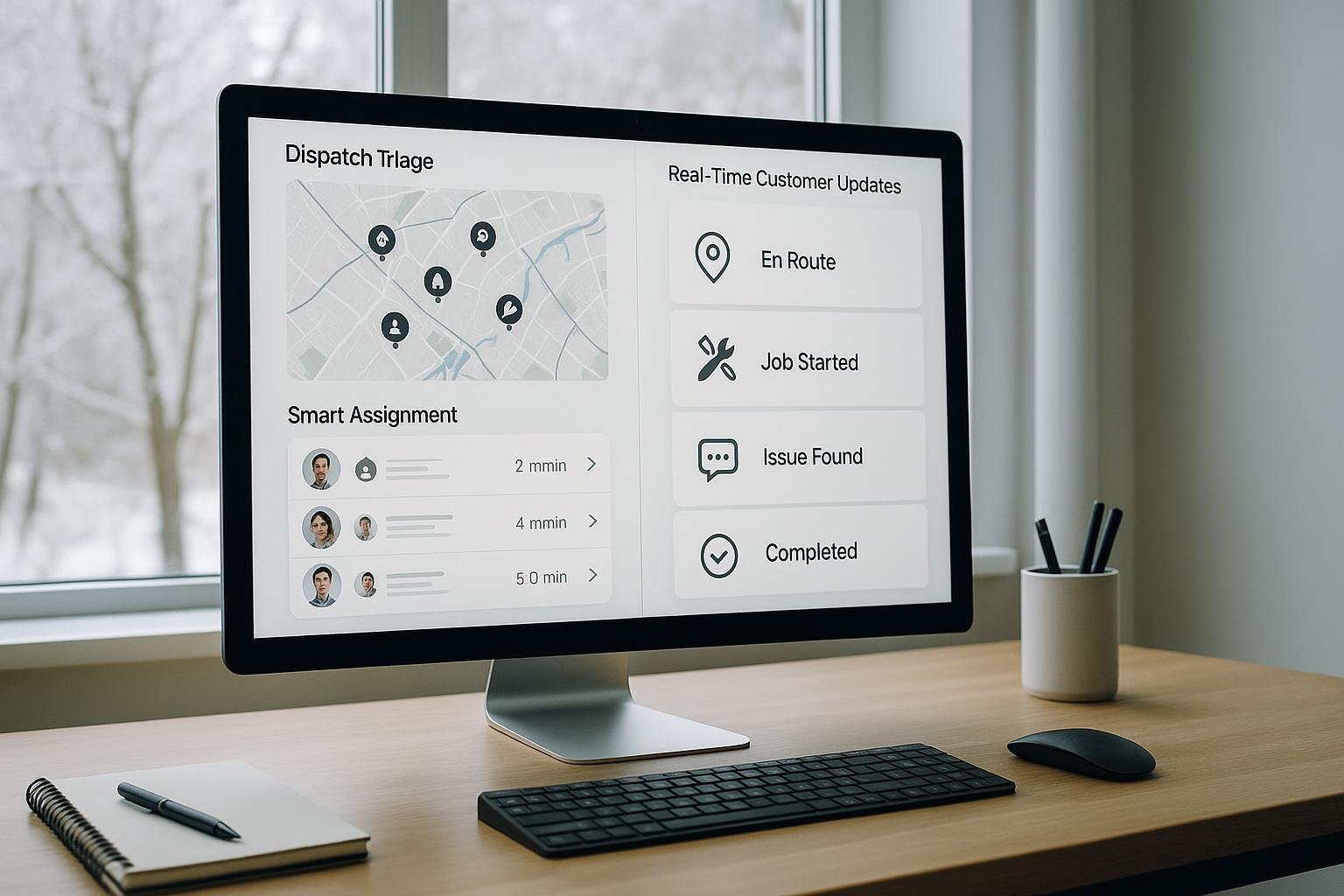
- What it does When a new work order arrives the automation uses no-code AI to assess priority, required skills, travel time, and technician availability. It proposes an optimal assignment and ETA to reduce triage time and improve first-visit odds.
- What you need to deploy A centralized data hub for work orders, access to technician calendars or availability, location data, an AI step for routing recommendations, and an integration to push assignments to the dispatch system. Have a test dataset to validate decisions before going live.
- How the deployment works Connect data sources pull new tickets, skill requirements, and technician availability into a single workspace. Define routing rules, set priority tiers and constraints (distance, skill match, current workload). Add an AI driven ETA model to generate a recommended ETA using distance, traffic, and workload. Publish the decision to the dispatch board so the ticket is immediately actionable. Test multiple scenarios to verify routing behavior.
- Expected impact Faster initial dispatch decisions, better match between ticket requirements and technician capabilities, and more predictable arrival windows. Customers receive faster timing information and dispatch teams save 10–30 minutes per ticket during triage.
Automation 2 Real-time customer updates and proactive alerts
- What it does As field technicians update status, the automation generates concise personalized updates and sends them to customers via SMS, email, or in-app notifications. It includes ETA refreshes and milestones such as arrival, work start, and completion.
- What you need to deploy Access to customer channels, a mapping of statuses to messages, and an integration to pull live updates from your field service system. A simple tone library helps maintain consistency.
- How the deployment works Define status triggers on changes such as en route, arrived, work in progress, and completed. Craft dynamic messages that include the customer name and location while keeping content concise. Configure delivery channels and test end-to-end.
- Expected impact Customers gain visibility and reduced call volume while dispatch teams save time on status communications. The organization benefits from clearer expectations and fewer inquiries.
Setup checklist
- Align on goals and baseline metrics: decide what success looks like for this sprint, for example reduce dispatch time by 15 percent and improve ETAs by 10 minutes.
- Inventory data sources: confirm where tickets live, where technician availability is stored, and where customer contact preferences are recorded.
- Choose your no-code tools: pick a primary automation platform, a data hub, and a messaging channel.
- Map data flows: sketch how data moves from tickets to dispatch to customer updates, including any required data transformations.
- Set access and permissions: ensure the right team members can view, edit, and approve automations and data connections before Saturday.
- Prepare a safe test run: create a sandbox or test tickets that mirror real scenarios so you can validate end-to-end behavior.
- Draft messaging style and guardrails: define tone, length, and opt-out options for communications.
- Plan the rollout: decide whether to run both automations in parallel or stage them (pilot automation 1 first, then automation 2 after a success signal).
- Assign ownership and a rollback plan: designate a point person for the Saturday deployment and a quick rollback plan if something goes wrong.
Success metrics
- Dispatch time from ticket creation to assignment: aim for a measurable decrease during the sprint.
- ETA accuracy and variability: compare predicted ETAs against actual arrival times, aiming for tighter windows.
- First-time fix rate and technician utilization: monitor whether smarter routing improves on-site first-time resolutions and balance workloads.
- Customer communication latency: time from ticket update to customer receipt, aiming to minimize delays.
- CSAT and NPS trend: track changes after implementing automated updates and improved dispatch.
- Support volume and call deflection: observe reductions in status check calls and emails as customers receive timely updates automatically.